
Parameters used in First Java Program
Let’s discuss about some of the keywords used in our program.
- class keyword is used to declare a class in Java.
public keyword is an access modifier that sets the visibility. It means this method is visible to all the classes and other methods and can be accessed from outside the package.
static is a keyword in Java. For an example, if we declare a method as static, we do not need to create a new object to invoke the static method.
void is the return type of the method. It means that the method isn’t returning any value.
main means that it is the starting point of the program.
- String[] args or String args[] is used as parameters in the main method. These are for the command line arguments.
System.out.println is used in Java to print the statement. In this line, System is a class, the word out is an object of the PrintStream class in Java where println() is the method under this class.
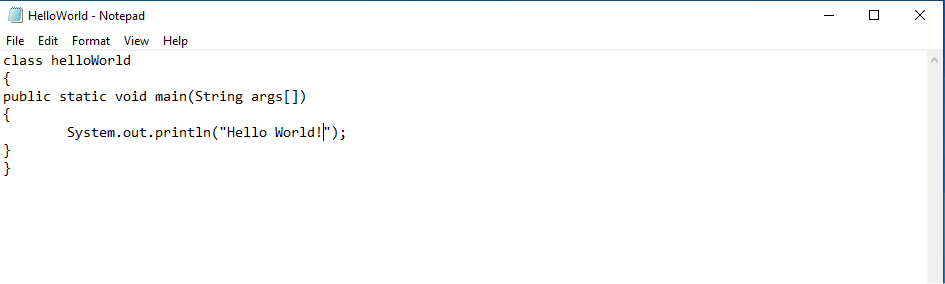
To write the HelloWorld Program, you need to open notepad by Start Menu -> Type Notepad on the Search Bar -> Click on Notepad and write a simple HelloWorld program as below:
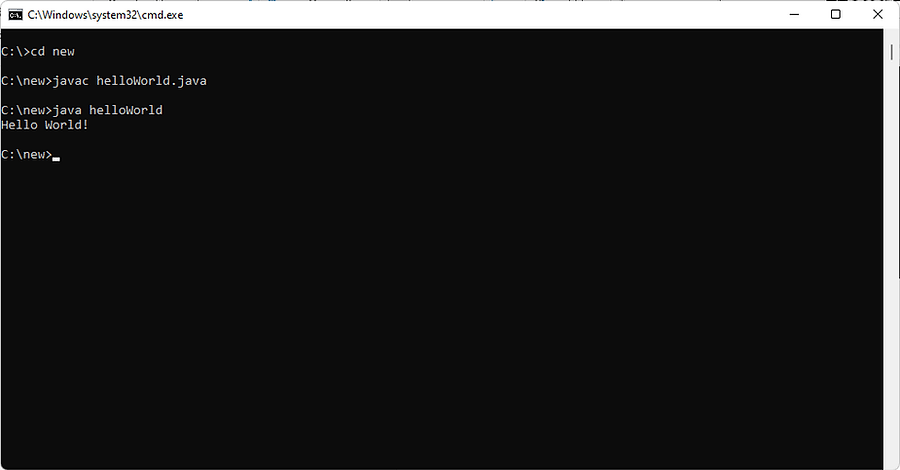
Now to compile and execute the above written program, you need to open command prompt by Start Menu -> Type cmd on Search bar and click on Command Prompt.
In how many ways we can write a Java program?
We can write Java program in many ways. The valid ways to modify the Java program are:
1. By changing the sequence of the modifiers, method prototype is not changed in Java.
For example, the main method can be written as static public void main(String[] args)
2. The subscript notation in the Java array can be used after the type, before the variable or after the variable.
Let’s see the different codes to write the main method.
- public static void main(String[] args)
- public static void main(String []args)
- public static void main(String args[])
3. You can provide variable arguments support to the main() method by passing 3 dots (ellipses)
For an example, public static void main(String… args)
4. Semicolon at the end of the class is optional.
Valid Java main() method signature
- public static void main(String[] args)
- public static void main(String []args)
- public static void main(String args[])
- public static void main(String… args)
- static public void main(String[] args)
- public static final void main(String[] args)
- final public static void main(String[] args)
- final strictfp public static void main(String[] args)
Invalid Java main() method signature
- public void main(String[] args)
- static void main(String[] args)
- public void static main(String[] args)
- abstract public static void main(String[] args)